
Solar and a home battery with Homey, when exporting earns little or costs you
When the grid pays little for the power you send back, or charges you for it, every kilowatt-hour you keep at home is worth the full import price. Solar panels and a home battery give you the energy. PELS decides where it goes.
PELS puts your home battery into your priority list, right next to your EV charger, water heater and heating. Your sun goes down that list in your order, and when the house nears its limit, the battery takes its turn: PELS caps its charge, then has it discharge to cover the peak. Leave it last, the default, and the battery covers the whole house before a single device is turned down.
When this is useful
Use this setup when you have solar panels and a home battery paired with Homey, and exported power earns little or costs you. It pays off even more on dynamic hourly or quarter-hour prices, with a capacity tariff, or with a daily budget.
What PELS needs from your battery
The battery's Homey app must let Homey set how much the battery charges and discharges, and offer a Homey or API control mode. Sessy and Marstek Venus are examples of batteries whose apps work this way.
A Sessy needs its local login in the Sessy Homey app, so PELS can switch it to API control.
Your battery keeps its own mode until PELS has a job for it
Self-consumption, the battery's own price trading and its own schedule keep running as usual. PELS takes the battery over only while it has a job for it: sharing your solar in priority order, or holding your limit when its turn comes. When the job is done, PELS hands the battery back to the mode it was in.
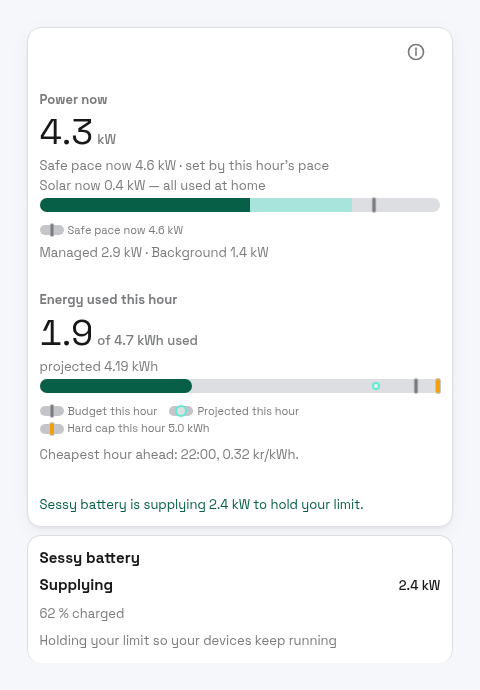
The battery shows up like any other managed device: a card on the Overview, a row in the device list and its own device page.
Your priority list decides everything
The battery has a place in each mode's priority list, like your devices. It is last by default, and you move it with Reorder on its device page or on the Modes page.
That one place decides two things:
- Who gets the sun. Solar surplus goes to your devices and batteries in priority order, and only what is left goes to the grid. With the battery last, your devices get the sun first, then the battery, then the grid. A device ranked below the battery gets what the battery leaves. A device ranked above it gets the solar first: if it is waiting to start, PELS lowers the battery's charge so the device can run.
- Who is limited first, and who the battery protects. When the house nears its limit, PELS limits in priority order, from the bottom up. When the battery's turn comes, PELS first caps its charge, then asks it to discharge enough to cover the rest. Devices below the battery are limited before it, and its discharge protects every device above it. Last in the list, it covers your whole home before any device is limited.
So if the battery starts its own cheap-hour charging from the grid while the car is charging, PELS caps the battery's charge, not the car. And at the dinner peak, a battery last in the list discharges so the heating, hot water and car keep running.
When the battery is empty, or does not follow what PELS asks, PELS simply moves on to the next device, exactly as in a home without a battery. Your limit holds either way.
On the device page
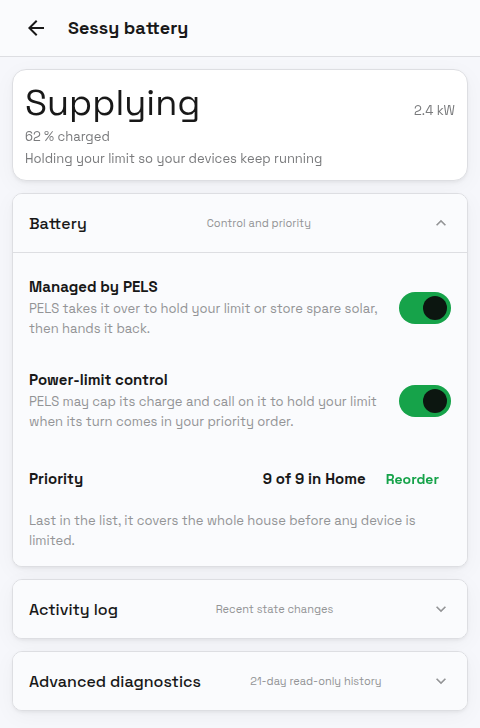
- Managed by PELS is the battery's main switch. Turn it off and PELS hands the battery back to its own mode and leaves it there until you turn it on again.
- Power-limit control is on by default for a battery PELS can drive. Turn it off and PELS never takes the battery over: it never caps its charge, never calls on it to hold your limit and never steers its charge for your solar, so its own app stays in charge. PELS still reads its power and charge level and shows it on the Overview. The Enable power-limit control for device and Disable power-limit control for device Flow cards work on the battery too, so a Flow can decide when the battery may hold your limit.
- Priority shows the battery's place in the current mode, for example
9 of 9 in Home, and Reorder moves it. - A battery PELS can only watch has no Power-limit control switch and no Priority row. Its card says why instead:
PELS can only watch it: its app does not accept control, orPELS can only watch it: its app does not give Homey controlfor a battery whose app gives Homey no power setting or Homey/API mode PELS can use. The Enable power-limit control for device Flow card skips it.
If you change the battery's mode in its own app while PELS holds it, PELS takes that as your decision: it turns Managed by PELS off for that battery and leaves it alone until you turn it back on. Its device page and its row under Settings > Devices say so.
What the battery card says
| Card | What it means |
|---|---|
Supplying · Holding your limit so your devices keep running | The battery discharges so the house stays under its limit. The Overview hero adds a line such as Sessy battery is supplying 2.4 kW to hold your limit. |
Charging · Storing the solar power your devices leave | PELS holds the battery for a device above it, and lets it store the solar that device leaves. |
Charging · Charging less so a device can use the solar | PELS lowered the battery's charge so a device above it can run on the sun. |
Limited · Charging · Waiting to charge faster | PELS capped the battery's charge at its place in the priority order, and gives the rest back as the house has room. |
Own mode · PELS takes over when your limit or solar needs it | PELS has no job for the battery right now; its own app is in charge. |
Own mode · PELS can only watch it: its app does not accept control | The battery's app refused PELS (for example a Sessy on its cloud login). PELS tries again after six hours or when PELS restarts. |
Own mode · PELS can only watch it: its app does not give Homey control | The battery's app offers Homey no power setting or Homey/API mode PELS can use, so PELS reads the battery and never controls it. |
Own mode · Power-limit control is off: its own app is in charge | Power-limit control is off for the battery. |
The fact line shows how full the battery is, such as 62 % charged. While PELS holds the battery, its own app shows Homey or API mode. That is PELS at work, and the mode you chose returns when PELS hands it back.
When PELS hands the battery back
- After a limit. Bringing the battery back is a normal resume in your priority order: once the house has room for the battery to charge in its own mode again, PELS hands it back to the mode it was in.
- After sharing solar. About two minutes after no device above the battery needs that power any more, PELS hands it back. A full battery is handed back at once.
- At once if the power meter stops reporting, or the battery stops responding.
- When PELS restarts. PELS keeps a record of every battery it holds, and hands each one back as it starts again.
If you uninstall PELS while it holds the battery, switch the battery's mode back in its own app.
Set it up
- Measure whole-home power with export. Use the Power meter power source through Homey Energy, or send a signed reading to the Report power usage Flow card, so the value goes negative while you export.
- Check that export is visible. On a sunny day the Overview shows a line such as "Solar now 3.2 kW, 1.1 kW at home, 2.1 kW exported", and the Solar card on the Usage tab counts Exported.
- Check the battery under Settings > Devices. For a battery PELS can drive, Managed by PELS and Power-limit control are on by default, so there is nothing to turn on. Turn Managed by PELS off if you want PELS to keep away from it. A battery whose app gives PELS no control shows
PELS can only watch itinstead of a Power-limit control switch. - Set an export price. Under Settings > Electricity prices, turn on Use an export price. With Homey Energy prices on a dynamic contract, set Where the price comes from to Homey Energy so PELS follows the feed-in price you already set up in Homey. A fixed amount can be negative if you pay to export. See Export pricing.
- Point devices at the sun. Turn on Use solar surplus on heating and water heaters, Run on solar surplus on on/off loads such as a pool pump, and Charge on solar surplus on the EV charger. See Solar and Self-Consumption.
- Place the battery in your priority list. Leave it last to give your devices the sun first and to cover the whole house at a peak, or move it up if filling the battery for the evening matters more. See Configuration.
- Add Smart tasks for what must be ready. A car charged by 07:00 or hot water by morning goes into a Smart task, and PELS picks the cheapest hours before the deadline.
A sunny day and an evening
Take a home with a 5 kW hard cap, 6 kW of panels, a 10 kWh battery, a water heater with Use solar surplus, and an EV charger with Charge on solar surplus. The battery is last in priority.
10:00. The panels make 3 kW and the house uses 1 kW. The water heater's target is raised, and it takes the surplus first. The battery's own mode stores what is left: its card reads Own mode · PELS takes over when your limit or solar needs it, with · charging on the fact line.
12:30. The car comes home and plugs in. The battery is already storing the sun, so PELS lowers its charge: Charging less so a device can use the solar. The car charges on the sun ahead of the battery, and the battery takes the rest. Almost nothing goes to the grid.
16:00. The car is full and the sun is fading. The battery takes every watt of surplus. About two minutes later PELS hands it back, and its own mode stores the rest.
18:00. Dinner, floor heating and the dishwasher push the house past its safe pace. The battery is last in the list, so its turn comes first: Supplying · Holding your limit so your devices keep running, and the hero reads Sessy battery is supplying 2.4 kW to hold your limit. No device is turned down, and the hour stays under 5 kW.
21:30. The battery is empty. PELS limits the floor heating in priority order, exactly as it would without a battery, and the hard cap still holds.
02:00. The battery's own schedule charges from the grid in a cheap hour, while a Smart task charges the car for the morning. As the house nears its limit, PELS caps the battery's charge first: Limited · Charging. The car finishes on time. When the house has room again, the battery's charge comes back in priority order and PELS hands it back to its own mode.
The battery's charging from the grid counts against your daily budget like any other load.