Skip to content

For Homey Pro

Intelligent, automatic power management for Homey Pro.

Homey app for Homey Pro

PELS watches your total power usage and turns down heaters, water tanks, ventilation, and EV charging before you hit your hourly limit. The moment there is room again, it brings them back in priority order. It plans Smart tasks around deadlines and shifts flexible load into the cheapest hours of the day — automatically, every hour, without you watching the meter.

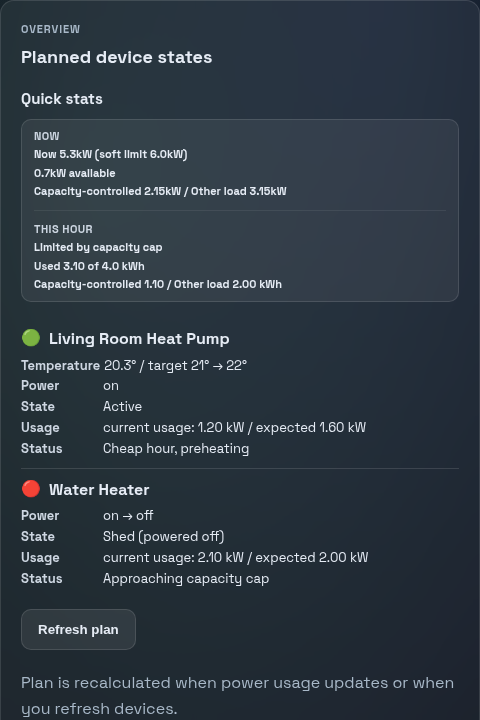
PELS Overview tab showing whole-home power now, the Safe pace now marker, and which managed devices are limited or resuming
The overview shows current whole-home power, the Safe pace now marker, and which devices PELS is limiting or resuming.

Is it for you?

PELS is worth it if any of this sounds familiar

You don't need a complicated setup to get value from PELS. A few power-hungry devices and an interest in your electricity bill are all it takes. Norwegian users can also read the Norwegian overview for strømstyring, kapasitetsledd, and elbillading.

You have devices that use a lot of power

Heaters, floor heating, water heaters, ventilation, and EV charging are the obvious wins. PELS turns them down when capacity gets tight and brings them back when there is room — comfort stays steady, the bill drops. For chargers, start with Homey EV charging without crossing your power limit.
You want to stay within your hourly limit

If you are on a power-based grid tariff (effekttrinn in Norway, and similar power-tariff models in Sweden and Finland) where consumption above a chosen level costs more, PELS can keep your hourly draw under the limit automatically.

You want flexible load to run when power is cheap

PELS can move heating, charging, and task-based load toward cheaper hours, so you spend less without having to check prices yourself. This works anywhere with dynamic hourly electricity prices — see Using Homey Energy if you are outside Norway.

Start by problem

Pick the problem that sounds closest to what you are trying to solve. Start with the use-case page when one exists, then continue into the setup guide.

Stay below a capacity tariff step or power limit

If your grid tariff gets more expensive above a chosen hourly level, start with power limiting. PELS watches whole-home power and limits lower-priority devices before the hard cap is crossed.

Compare cost-saving functions · Open configuration docs

Charge an EV without crossing your whole-home power limit

If your charger is paired in Homey, PELS can calculate the charging current while still protecting the house limit. Your Flow maps the PELS current value to the charger app. If the real goal is a battery target by morning, use deadline charging with state of charge.

Read the EV charging use case · Deadline Charging With State of Charge · Configure an EV charger · Zaptec example

Move hot water, heating or ventilation toward cheap hours

If a water heater, floor heating, panel heater or ventilation unit can run earlier or later, use price shifting, Smart tasks or Flow-booked cheap hours. The hard cap still takes priority.

Read the hot water and heating use case · Compare cost-saving functions · Smart Tasks · Book cheap hours with Flows

Use Home, Away and Night for different energy behavior

If your home should behave differently when you are home, away or asleep, configure modes and switch them from Homey Flows. Modes can change comfort targets and priorities without rebuilding your automations.

Read the modes use case · Open configuration docs · See available Flow cards

Use Homey Energy, Tibber Pulse, AMS/HAN/P1 or Flow data as input

PELS needs whole-home power and, for price features, a price source. Homey Energy can provide both in many setups; Flow data can be used when you already have another meter or price source.

Using Homey Energy · Getting Started · Price tags in Flow & HomeyScript

Inside Homey

Four things you use in practice

PELS lives entirely inside Homey. You configure it in the settings page, connect it with a few Flows, add Smart tasks when something must be ready, and check what it is doing in the overview.

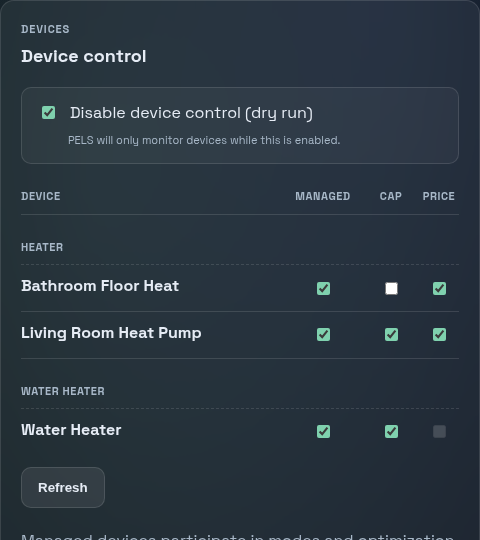
PELS Devices page listing managed heaters, a water heater, and an EV charger with Managed, Limit, and Price toggles
The device list is where you choose which devices are managed, can be limited to stay under the hard cap, or adjusted by price.

Device control

Pick the devices PELS can control, set your hard cap, and choose how it should behave in different situations — like daytime vs. nighttime.

Open configuration docs
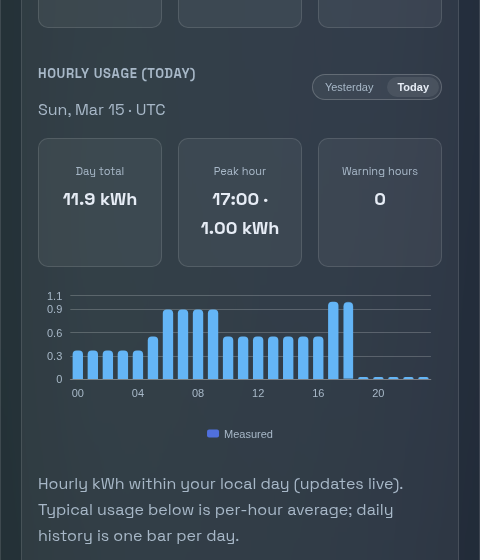
PELS Usage tab showing an hourly energy bar chart of managed and background power use
Usage shows hourly and daily energy history so you can see how the home behaves over time.

Usage and insights

See how much power you are using, track hourly and daily totals, and understand your home's consumption patterns over time.

Open PELS Insights docs
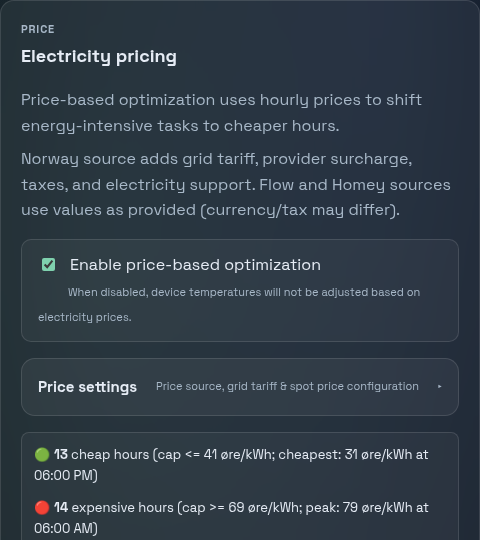
PELS price view showing the current price source and the cheap and expensive hours used to shift flexible load
Price settings show the current price source and the cheap/expensive hours PELS can use to choose when flexible devices should run.

Price optimization

PELS knows when electricity is cheap or expensive and shifts flexible load to save money automatically, based on spot prices.

See available Flow cards

Smart tasks

Tell PELS that a charger, room, or water heater should be ready by a specific time, and it plans useful hours before the ready-by time.

Open Smart tasks docs

Get started

Start with a basic setup in about 15 minutes

Install the app, connect your power meter, set a limit, and pick one or two devices PELS should control. That is enough to start learning how it behaves — you can add EV charging, modes, Daily Energy Budget and Smart Tasks later.

Getting started

Install PELS from the Homey App Store, open the settings page, and create the Flow that sends your power meter reading to PELS.

Open getting started

Configuration

A full walkthrough of every tab in the settings page — devices, modes, budget, prices, and more.

Open configuration docs

Going deeper

Compare the cost-saving functions, set a daily energy budget, book cheap hours with Flows, or fine-tune EV charging.

Compare cost-saving functions

New to PELS? How PELS decides explains it in plain language, the Glossary defines every term, and Troubleshooting fixes the common snags.

Looking for the source code or want to contribute? See Contributor Setup or GitHub.

Built for Homey Pro users who need tighter control over large loads.