
How-To: Wire a Flow-Based Load Device to PELS
Use this pattern when a real Homey device has its own stepped power modes, but PELS should still decide which step to use.
Typical devices:
- water heaters with
Low/Medium/Max - EV chargers with stepped current/power levels
- other controllable loads with discrete states
For built-in stepped-load devices, PELS owns the decision and your Homey Flows only do the vendor-specific mapping.
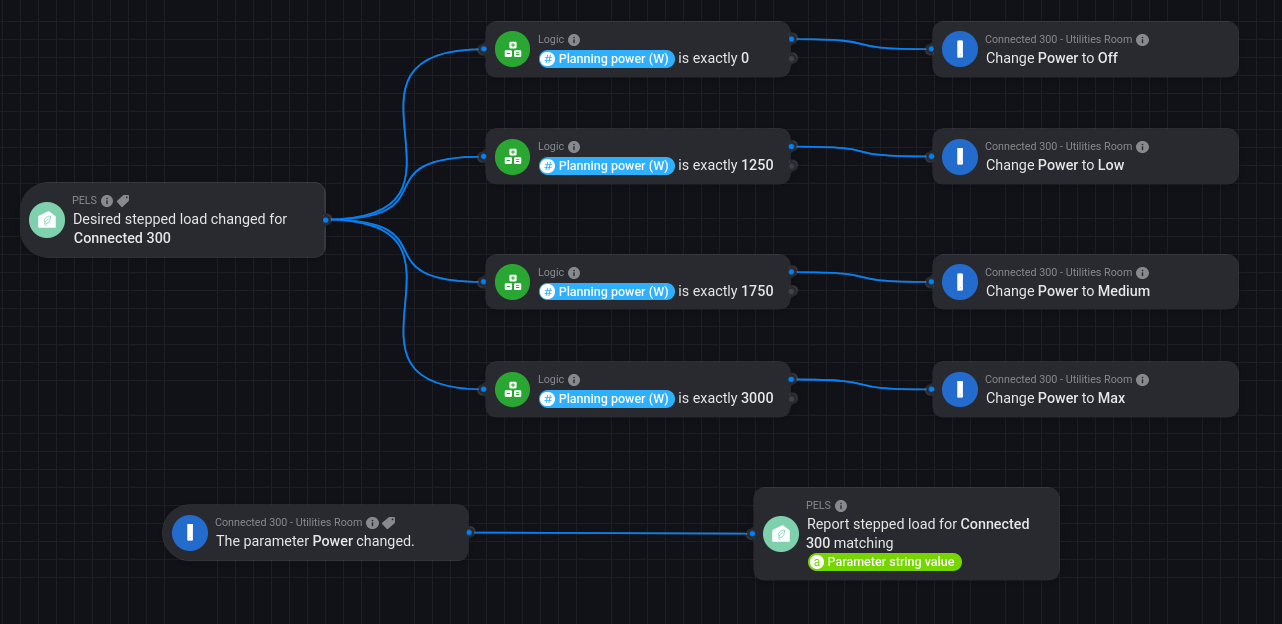 Figure 1. Example wiring for Høiax Connected 300: PELS emits the desired step, and the device reports its selected step back into PELS.
What You Are Building
Two Flow paths:
Outbound desired-step mapping When PELS changes the desired stepped-load level, your Flow maps that generic intent to the vendor action card.
Inbound step feedback When the device changes level, your Flow reports the selected step back into PELS.
This keeps three values separate:
- selected step on the device
- measured power right now
- planning power that PELS reserves for that step
Why This Works
For stepped-load devices, measure_power is not enough to know the selected level:
- the heater may be set to
Maxwhile drawing0 W - the live draw may be lower than the configured step
- the vendor app may report step changes separately from power
That is why PELS needs explicit step feedback from your Flows.
Example Mapping (Connected 300)
| Step | Planning Power | Vendor Action |
|---|---|---|
| Off | 0 W | Change Power to Off |
| Low | 1250 W | Change Power to Low |
| Medium | 1750 W | Change Power to Medium |
| Max | 3000 W | Change Power to Max |
In the screenshot:
- the top Flow reacts to Stepped device target changed for Connected 300
- each branch checks the Planning power (W) token and calls the matching Høiax action
- the bottom Flow listens for the device's own power or parameter change and reports the matching stepped-load level back into PELS
If your device app exposes a direct level trigger, prefer reporting the step directly with Report stepped load for [device] as [step]. If it only exposes a power value, use Report stepped load for [device] matching [power].
Setup Checklist
- In the PELS device settings, set
Control modeltoStepped load. - Define the device steps and planning power values.
- Choose how far When limiting may go:
Turn off(as far as off) orSet to step(as far as the lowest active step). PELS goes only as deep as it needs, so a stepped device will often be left running at a lower step either way. - Create the outbound Flow from Stepped device target changed for [device] to the vendor action cards.
- Create the inbound feedback Flow with either: Report stepped load for [device] as [step] or Report stepped load for [device] matching [power]
Common Pitfalls
- Forgetting the feedback Flow. Without it, PELS only knows what it last asked for.
- Treating
measure_power = 0as if the selected step wereOff. - Mapping vendor power feedback to the wrong configured planning power.
- Using Set expected power for device for a stepped-load device. That card is legacy and is rejected for built-in stepped loads.
PELS Cards Used
- Stepped device target changed for [device]
- Report stepped load for [device] as [step]
- Report stepped load for [device] matching [power]