
Run hot water and heating in cheaper hours with Homey
Water heaters, floor heating, panel heaters and ventilation can use a lot of power. They are also often flexible: they do not always need to run at the exact moment the price is high.
PELS helps Homey move flexible load toward cheaper hours while still protecting the hard cap. That matters because the cheapest hour is not always the best hour if EV charging, cooking, heating, and hot water all run at the same time.
When this is useful
Use this setup when you want to:
- heat water in cheaper hours
- preheat rooms before you come home
- lower heating when prices are high
- avoid running several large loads at the same time
- keep the home below a capacity tariff step or hard cap
- let higher-priority devices win when available power is limited
PELS shines on loads that can move in time — water heaters, floor heating loops, and panel heaters all carry enough thermal buffer to shift cleanly into the cheapest hours of the night.
Safety: Use equipment rated for the load and have any fixed electrical work done by qualified professionals. PELS schedules the load on top of the same safe hot-water and heating controls you already use.
Price shifting still needs a hard cap
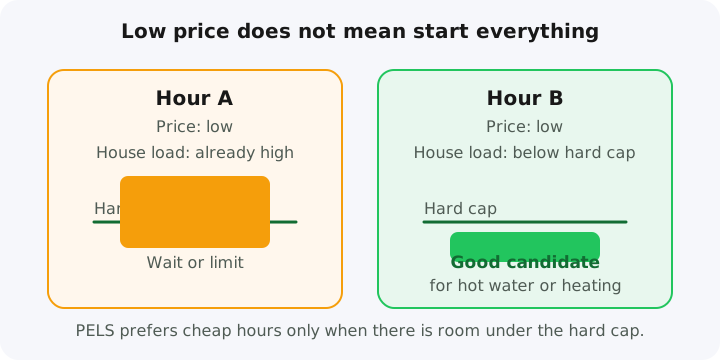
A common mistake is to turn on every flexible device when the price is low.
That can backfire. If hot water, floor heating, ventilation boost and EV charging all start in the same cheap hour, the home may cross the hard cap or move into a more expensive capacity tariff step.
PELS treats the hard cap as the boundary. Price shifting happens inside that boundary.
Typical priority setup
A simple default priority order could be:
- critical heating
- hot water
- normal room heating
- EV charging
- ventilation boost or other flexible comfort loads
Tune the order to fit your home. Push EV charging up the list when the car has to be ready early; pair the water heater with a Smart task when hot water has to be ready by a specific time.
Water heater example
A water heater is a good candidate for cheap-hour shifting because it stores heat.
PELS can prefer cheaper hours when there is enough room under the hard cap. If the house load gets too high, PELS can lower, pause or turn off lower-priority devices first. When power becomes available again, PELS resumes devices in priority order.
For a compatible water heater, built-in device control is on by default, so PELS adjusts the heater directly without you wiring up Homey Flows. If you already run a Flow that sets the heater's power level or turns it on or off, PELS leaves built-in control off and shows a notice on the device so the existing setup keeps working. To switch, turn off only the conflicting action in that Flow, then enable built-in device control under the device's Setup section. A Flow that only reads the device, or only adjusts its temperature, does not count as a conflict.
For one-off needs, use a Smart task. For example:
- hot water should be ready before morning
- the tank should recover after heavy use
- heating should finish before a known deadline
Start here:
What the shift saves (illustrative)
A water heater that uses about 5 kWh a day to stay hot doesn't care when it heats. Move that load out of a 1.20 kr/kWh evening and into 0.40 kr/kWh night hours, and you pay roughly 2 kr instead of 6 kr for the same hot water — about 4 kr a day, or ~120 kr a month, from one device.
The numbers are illustrative: your savings depend on your own price spread and how much load you can actually shift, and a budget caps energy, not money. PELS does the shifting automatically once the heater is price-aware or booked into cheap hours. To see your figures, watch the Budget → Hourly plan view (managed load against the price line) and the price level on PELS Insights.
Heating example
Heating is often flexible, but only within comfort limits.
PELS can use Home, Away and Night modes to apply different comfort targets and priorities. For example, heating can be more relaxed while away, stricter when home, and biased toward cheap hours overnight.
Start here:
Ventilation example
Ventilation boost modes and higher fan levels are excellent secondary targets. Anywhere ventilation is controllable from Homey, PELS treats it as another prioritized load — boosting in cheap hours, easing off during a peak — while you keep your existing indoor-air baseline.
What you need
You normally need:
- Homey Pro
- whole-home power measurement through Homey Energy, Tibber Pulse, AMS/HAN/P1 or Flow data
- a price source if you want cheap-hour shifting with dynamic prices or spot price
- one or more controllable devices in Homey
- configured priorities in PELS
- sensible comfort limits for heating and hot water
Reliable whole-home power data plus controllable devices in Homey is everything PELS needs to start moving load and saving money.
Which PELS feature should you use?
Use this rough guide:
- Use power limiting when the main concern is staying below the hard cap.
- Use price shifting when the load can move to cheaper hours.
- Use daily budget when you want PELS to pace energy use across the day.
- Use Smart tasks when something must be ready by a specific time.
- Use Flow-booked cheap hours when you want Homey Flows to reserve specific cheap-hour windows.
Start here: