
Solar and Self-Consumption
If you have rooftop solar (PV), this page explains what PELS does with it today.
Short version: your solar protects your capacity for free, and PELS puts your surplus to work: it raises a heater's target, runs an on/off load such as a pool pump only while you export, or matches an EV charger's current to your surplus, instead of sending it to the grid. With a home battery, your surplus goes down your priority order, the battery included, and when your home nears its limit the battery discharges on its turn. Left last in the list, the default, your devices get the sun first and the battery covers your whole home before any device is limited. PELS also shows what your solar did: production, self-consumption, export, and the grid cost it avoided.
Needs a signal that you export
The solar features below need a signal that you are exporting — either a solar device that reports production, or a meter that shows your solar export.
On the Power meter power source (read through Homey Energy) both signals are available, and every feature on this page works.
On the Flow power source, send your meter's reading to the "Report power usage" card exactly as your meter gives it: if it reports a signed value, a negative reading means you are exporting, and PELS reads it as export. If your meter is published as two separate devices — one for import, one for export — send import − export so the number you report can go negative. Everything on this page works here too: capacity protection, the export accounting below, your panels' production, the heating surplus boost, and running an on/off device on surplus.
Two things follow from PELS only knowing what you send it. The surplus controls — the heating boost and running an on/off device on surplus — stay hidden until PELS has actually seen your home export, and appear on their own once it has; a reading that never goes negative simply leaves those devices running as usual. And the Solar card says so: while production is measured but export never has been, it shows a note asking you to check that the reading turns negative while you export. The one thing that stays Power-meter-only is the estimate PELS makes for a zero-export inverter (described below), which needs your production and your meter reading to be taken at the same instant.
What to do today
To use more of your own solar with PELS:
- Confirm PELS can see your export — on the Power meter source, that your solar device's production shows up in Homey Energy; on the Flow source, that the reading you send goes negative while exporting. Capacity protection then works automatically — there is nothing else to turn on.
- Optionally turn on "Use solar surplus" on a managed heating device (a water tank, floor heating, or a room heater) so surplus warms your home instead of going to the grid.
- Keep an EV charger managed with current control. While the sun is up, a charging car naturally uses the freed-up power, so much of that charge comes from your own solar. To go further and charge only on the sun, turn on "Charge on solar surplus" on the charger.
How much this helps depends on your home and the weather.
What PELS does with solar today
Capacity protection just works
PELS watches your net grid power. When your panels cover part of the load, your net draw is lower, so there is more available power and PELS limits your managed devices less — exactly when the sun is out. This follows from how PELS measures power; there is nothing to turn on. See Solar Accounting.
Where exported solar earns roughly the spot price, self-consumption is a modest gain, and the bigger win from panels is this automatic capacity protection. Where exported energy earns little, or costs you (see below), using your own solar matters much more.
Use solar surplus to heat your home
On a managed heating device you can turn on "Use solar surplus" (the toggle appears once PELS can see your solar — either a solar device reports production, or your meter has shown solar export, which covers a string inverter with no separate solar device). When you are exporting enough to cover that device's own draw, PELS raises its target by the "Solar-surplus boost" amount (in °C, default +2), so the surplus warms your home or water instead of going to the grid. A small or short-lived export may not be enough to engage it.
 Figure 1. Turn on "Use solar surplus" on a managed heating device.
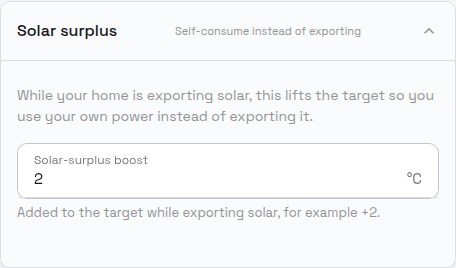 Figure 2. "Solar-surplus boost" sets how much to lift the target while you are exporting.
This boost:
- yields to your hard cap and daily budget — capacity protection always comes first, and the boost's energy counts toward your daily budget like any other use;
- works on any managed device with a temperature target (a water heater, floor heating, or a thermostat) that has a target set for the current mode;
- is a small, fixed step — once the room or tank reaches the raised target, the device stops drawing and any further surplus is exported.
PELS waits for the surplus to settle before engaging, and — to avoid flapping on passing clouds — it briefly holds the raised target for a few minutes after export stops before easing back. While the boost is engaged it takes precedence over any price-based lowering (your own solar is free); the rest of the time your normal price-based targets apply. It is a gentle "use a bit more of my own solar" nudge, not a precise export-to-zero controller.
If your inverter is set to zero export (it throttles production so nothing is sent to the grid), the meter never shows a surplus — so PELS estimates one instead. This estimate needs the Power meter power source: it compares your production against your meter reading, and only that source takes the two at the same instant. It learns your panels' potential in the current weather from your own production history and verifies it against real production: when actual production sits clearly below that potential, the same boost can engage to soak up the hidden surplus, and your inverter naturally produces more to cover it. If production does not follow — your home starts drawing from the grid instead — PELS eases the boost back promptly and waits a while before trying again. This estimate needs some weeks of production history before it can engage, it stays cautious (it backs off whenever your home draws meaningfully from the grid — only the small standing draw of a couple hundred watts that zero-export setups normally show is tolerated — and your hard cap and daily budget still come first), and it is disabled when a home battery is present, since PELS cannot tell a throttled inverter from a charging battery.
Run an on/off device only on solar surplus
On a managed on/off device you can turn on "Run on solar surplus" (the toggle appears once PELS can see your solar — either a solar device reports production, or your meter has shown solar export). PELS then keeps the device off and turns it on only while your export comfortably covers its draw — the same settle-and-hold behaviour as the heating boost, so passing clouds don't flap it. When the surplus is gone, PELS turns it off again.
Before you use it:
- If you switch the device on yourself while there is no surplus, PELS will switch it off again. The toggle hands the on/off decision to PELS; turn the toggle off to take the device back.
- Turning the toggle off while the device is off: PELS then treats it like any other managed device and starts it when there is room, from the grid if needed. To keep it off instead, also turn on Leave off until turned on again for the device (Configuration); it then stays off until it is turned on, even if you turn the toggle back on.
- Use it for loads that can wait for the sun: a pool pump, a towel dryer, a garage or cabin heater.
Not for your only water heater
Through a run of cloudy days a device set to run on solar surplus never turns on, and a tank that never heats is a comfort (and hygiene) problem. Turn the toggle off if the device must run regardless of weather.
The device shows "Waiting for solar surplus" on its card while PELS keeps it off, and "On to use your solar power" while running on your export. Devices with an active smart task are not held — the smart task's schedule wins.
Charge a car on solar surplus
On a managed device with levels — an EV charger set to an EV control mode, or any device you configured as a stepped load — you can turn on "Charge on solar surplus" (a charger) or "Match solar surplus" (anything else). PELS then picks the level your export covers and moves it up and down as the sun changes, instead of running the device as hard as your hard cap allows.
For an EV charger this is the "leave it plugged in all week" setting: the car charges on the sun, and stops when the sun stops.
There is a floor to this: a charger's lowest usable current is 6 A — about 1.4 kW on one phase, about 4.1 kW on three — and below that there is nothing to select. When your surplus cannot cover even that, PELS stops the device, exactly as it would if it needed the power back for your capacity. Where it stops is whatever you chose under Power limiting on that device, so the answer is the same one PELS already uses everywhere else.
Some things to know:
- Your hard cap and daily budget still come first. The surplus setting can only ever lower the level PELS would otherwise pick, never raise it past a capacity decision.
- A smart task wins. If the device has a smart task with a deadline, the task's schedule decides while it is running — a deadline you asked for is not something "use only your own sun" should quietly miss.
- It moves in steps, not smoothly, and it waits a couple of minutes between increases so a passing cloud does not change your charging current every few seconds. Decreases are immediate.
- The card reads "Waiting for solar surplus" while PELS is holding the device back.
Big flexible loads use the freed-up power
A managed device that is not set to match your surplus runs as hard as it can — an EV charger with current control takes up the room solar frees, up to your hard cap. So if a car is charging while the sun is up, much of that draw comes from your own solar rather than the grid.
PELS runs these loads to available power up to your hard cap, not matched to your surplus — so a large load can keep running (drawing from the grid) past the point the sun alone would cover, and charging after dark pulls entirely from the grid. If that is not what you want, the surplus setting above is how you change it.
Your accounting stays honest under export
When you export, PELS still uses net grid import for the hard cap, the daily budget, and your usage totals. An export hour is treated as zero energy used, so it never subtracts below zero or distorts your budget. Where your device meters show usage your panels covered locally, the managed/background split is labelled "Before solar:". See Daily Energy Budget.
See what your solar does
The Usage tab shows a Solar card with today's numbers so far — Produced, Used at home (kWh and the share of production you consumed yourself), and Exported — plus a compact previous-days view. When electricity prices are configured, the card also shows Grid cost avoided today (what the self-consumed energy would have cost to import) and, once an export price is set under Settings > Electricity prices, Earned from export today. The two figures cover different energy — what you used yourself versus what you sent out — so they are shown side by side, never summed into one "savings" number. Money figures are estimates (≈), and a value where some hours have no price yet says so.
The Usage hero's headline still counts what you drew from the grid, so on a sunny day it can look surprisingly small next to the Solar card. The hero adds a "+ 1.5 kWh of your own solar" line naming the energy your panels covered locally — the grid never saw it, so it is not in the headline number.
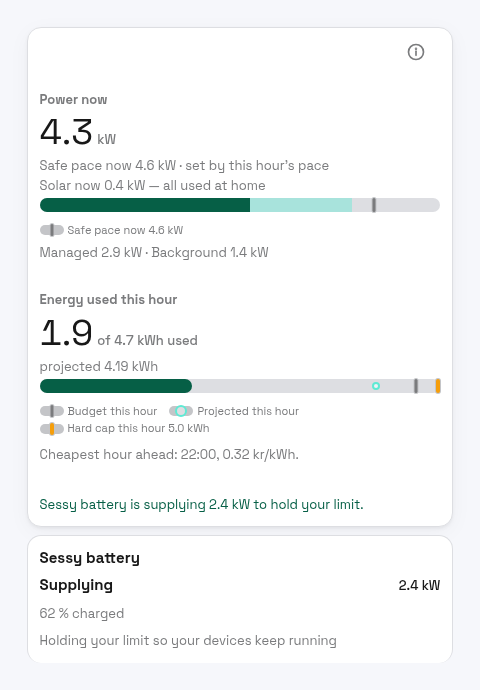
While the sun is up, the Overview hero adds a live line under Power now — for example "Solar now 3.2 kW — 1.1 kW at home, 2.1 kW exported" — so you can see at a glance where your production is going right now. While you export, "Power now" (your net grid power) can legitimately read negative; this line is what makes that reading make sense.
Three honest edges to know about:
- Battery homes: Exported can be higher than Produced in some hours — a battery discharging to the grid exports stored energy on top of (or instead of) live production. The card notes this rather than hiding it.
- A meter without a production reading (your export is visible but no solar device reports production): the card falls back to an export-only view and never pretends to know your production. This applies on either power source — what decides it is whether a solar device reports production, not how your meter reading reaches PELS.
- A Flow that reports on a timer: on the Flow power source, PELS counts your export from the readings your Flow sends, and between two readings it assumes the last one still holds, exactly as it does for the power you import. If your Flow reports only every few minutes, export in the Solar card is only as precise as that: a cloud that stops your export right after a reading is not seen until the next one. Your production is not affected, because PELS reads it from Homey every 10 seconds. For accurate export, send your meter reading whenever it changes rather than on a fixed interval.
Home batteries
PELS makes your home battery part of your priority list. Your sun goes to your devices and the battery in the order you choose, and when your home nears its limit, the battery takes its turn: PELS caps its charge, then has it discharge to cover the peak. Left last in the list, the default, the battery covers your whole home before a single device is turned down. For a full walkthrough with a sunny day and an evening, see Solar and a home battery.
What it works with. PELS works with a home battery whose Homey app lets Homey set how much it charges or discharges, and offers a Homey or API control mode. Sessy and Marstek Venus are examples. A Sessy needs its local login in the Sessy Homey app, so PELS can switch it to API control.
A managed device like any other. The battery has a card on the Overview, a row in the device list and its own device page. The card leads with what the battery is doing (Supplying, Charging, Limited · Charging or Own mode), shows how full it is, and gives one reason line, such as Holding your limit so your devices keep running. While the battery holds your limit, the Overview hero says so: Sessy battery is supplying 2.4 kW to hold your limit.
Its own mode keeps running until PELS needs it. PELS takes the battery over in its Homey or API mode only while it has a job for it, and hands it back to the mode it was in when the job is done. The battery's own self-consumption, schedule or price trading keeps working the rest of the time.
Solar surplus follows your priority order. Your surplus goes down the list to your devices and batteries, and only what is left goes to the grid. With the battery last, your devices get the sun first, then the battery, then the grid. A battery's own mode usually stores the sun before your devices see it, so PELS counts what the battery is storing as surplus for the devices above it: when a device set to use surplus (a heater with Use solar surplus, an on/off device with Run on solar surplus, or a charger with Charge on solar surplus) ranks above the battery and is waiting to start, PELS lowers the battery's charge so the device can run. A battery above a device keeps its charge, and the device gets what the battery leaves. Stored energy is never spent on surplus: PELS only moves solar you would otherwise export, so sharing it never takes your home over its limit.
The battery holds your limit on its turn. When your home goes over its limit, whether that is the capacity limit or your daily budget pace, PELS limits in priority order, from the bottom of the list up. When the battery's turn comes, PELS first caps its charge, then asks it to discharge enough to cover the rest. Devices below the battery are limited before it, and its discharge protects every device above it. Grid charging counts against your limit and your daily budget like any other load, so a battery that starts its own cheap-hour charging while your car charges is capped before the car is slowed. An empty battery, or one that does not follow, delivers nothing, and PELS moves straight on to the next device.
Bringing it back. After a limit, the battery comes back like any device: in your priority order, once your home has room for it to charge in its own mode again, PELS hands it back to the mode it was in. After sharing solar, PELS hands it back about two minutes after no device above it needs that power, and a full battery at once.
You stay in charge. On the battery's device page:
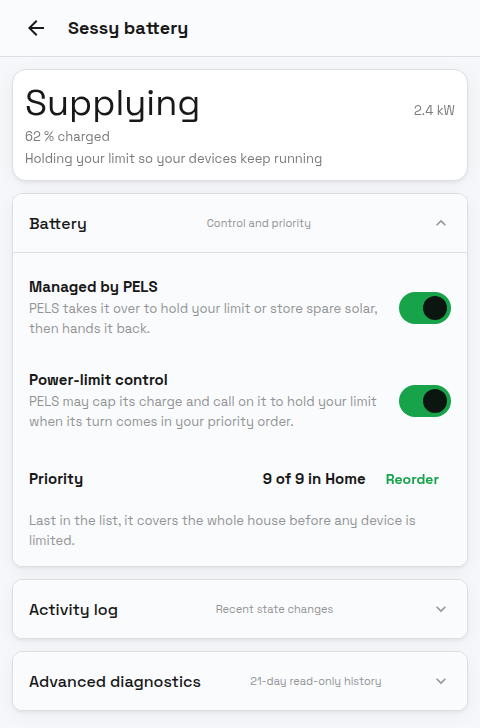
- Managed by PELS is the battery's main switch. Off, PELS hands the battery back and leaves it alone.
- Power-limit control is on by default for a battery PELS can drive. Off, PELS never takes the battery over: no charge cap, no call on it for your limit, and no steering of its charge for your solar. Its own app stays in charge, PELS still counts its power and charge level, and its card reads
Power-limit control is off: its own app is in charge. The Enable power-limit control for device and Disable power-limit control for device Flow cards work on batteries too. - Priority shows the battery's place in the current mode, and Reorder moves it.
If you change the battery's mode in its own app while PELS holds it, PELS takes that as your decision: it turns Managed by PELS off for that battery, says so on its device page and in the device list, and leaves it alone until you turn it on again.
PELS also hands the battery back at once if your meter stops reporting or the battery stops responding, and when PELS restarts it hands back every battery it held. If you uninstall PELS while it holds the battery, switch the battery's mode back in its own app. A battery in a meter area keeps its own mode, and Simulation mode leaves every battery in its own mode too.
Export pricing
Exported solar is often worth far less than the power you would otherwise buy, and on some contracts it costs you: when net metering ends or your supplier charges a fee for feeding in, every kilowatt-hour you export can cost money, so using your own solar becomes a direct saving rather than a smaller return.
PELS lets you tell it what exported power is worth to you. Under Settings > Electricity prices, turn on "Use an export price" (the section appears once PELS can see your solar, meaning a managed solar device reports production or your meter has recorded about a kilowatt-hour of grid export, and stays visible if you already have an export price configured).
If your electricity prices come from Homey Energy, you can then set Where the price comes from:
- Homey Energy: PELS uses the feed-in price you already set up in Homey under Energy > Electricity. That can be a fixed amount, or a formula that follows the hourly price, which is how most dynamic contracts pay for exported power. Nothing to retype. See Getting paid for solar you export.
- Amounts I enter here: the two amounts below. This is the default.
On the other price sources, or with Amounts I enter here, enter what your power company pays you:
- Share of spot price — how much of the hourly spot price (incl. VAT) you are paid per exported kWh, as a percentage. Available on the Norway price source, which has an hourly spot price; if your contract pays the raw spot price, enter 80.
- Fixed amount — added for every exported kWh, in the same unit as your other prices. It can be negative if you pay to export. On the Flow and Homey Energy price sources this fixed amount is the whole export price, since no hourly spot price is available there. On Homey Energy, choose Homey Energy above instead if your feed-in price follows the hour.
Once it is on:
- the Budget tab shows "Export price now" — the current hour's export price;
- scheduling uses it through the planning price: in hours where PELS expects your solar surplus to cover flexible load, it plans against what that energy is actually worth to you (the export price) rather than the import price — steering flexible load such as deadline EV charging into sunny hours.
Your money figures stay honest: receipts, usage costs, and the budget's money view remain on the import price you are billed, so they reconcile with your invoice.