
How PELS Decides
You don't need to know the internals to trust PELS, but a simple mental model helps. This page is the big picture in plain language. For the exact rules and numbers, see the Technical Reference; for definitions of any word here, see the Glossary.
One loop, over and over
Every time your whole-home power reading changes, PELS runs the same short loop:
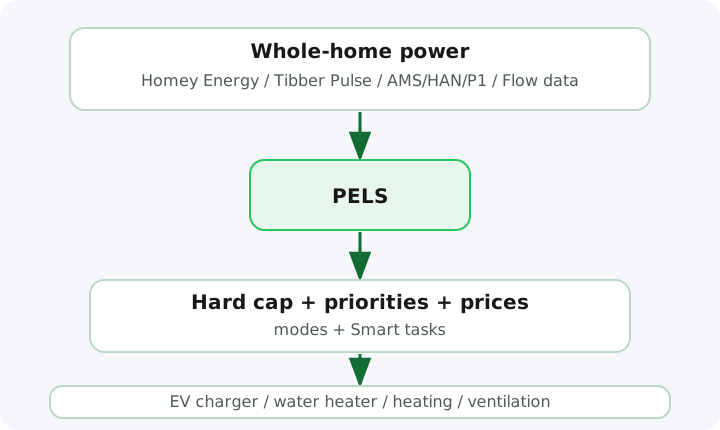
- Measure. Read how much power the home is drawing right now (from Homey Energy or a Flow).
- Plan. Compare that against your hard cap, today's daily budget, prices, the active mode, and any Smart tasks.
- Act. Lower, pause, or resume the managed devices it controls — gently, with short cool-downs so nothing flaps on and off.
The next reading starts the loop again, so PELS keeps adapting to what actually happened.
What PELS protects, in order
The features stack. Each one works inside the one above it, so they never fight:
- The hard cap comes first. PELS will always act to keep the home's hourly average under your hard cap. This is the only thing that triggers an urgent alert, because crossing it costs you — a higher capacity tariff step.
- The daily budget paces the day. If you've set one, PELS spreads your kWh target across the day and slows the home down when it's running ahead — but only ever makes PELS more cautious, never less. It's a soft target, not an alarm.
- Prices steer flexible load. With a price source, PELS nudges water heaters, floor heating, and charging toward the cheapest hours, and trims comfort slightly in the priciest ones — all still under the cap.
- Smart tasks reserve attention for deadlines. When one device must be ready by a time, a Smart task gives it the hours it needs — still inside everything above.
How PELS chooses what to turn down
PELS reacts at the safe pace: the power level that keeps the remaining energy allowance on track. During an under-used hour it can sit above the hard cap minus your safety margin, then tighten toward that steady rate as the hour ends. On the 15-minute period it never rises above that rate. A tighter daily budget can lower the pace further. When the home crosses the safe pace, PELS eases devices off in priority order: the least important device (highest priority number) goes first, the most important stays running longest. Priorities are per mode, so your bedroom can outrank the water heater at night and not during the day.
Where a home battery fits
A home battery has a place in that same list, last by default. When its turn comes, PELS first caps the battery's charge, then asks it to discharge enough to cover the rest. Discharge happens only on the battery's turn: the devices below it are limited first, and every device above it is protected. Left last, the battery's turn comes before any device's, so it covers the whole house before anything is turned down. An empty battery delivers nothing, and PELS moves on to the next device. The same order shares your solar surplus: devices above the battery get the sun first, then the battery, then the grid. See Solar and a home battery.
How PELS brings devices back
As power frees up, PELS resumes devices in the opposite order — most important first. It waits a short cool-down between steps (60 seconds after limiting, 60–300 seconds before resuming) so devices don't rapidly flip on and off. If the day is running ahead of its daily budget, resumes wait a little longer.
What you set vs what PELS does
| You decide (once) | PELS handles (every hour) |
|---|---|
| The hard cap and safety margin | Watching live power and projecting the hour |
| Which devices are managed, and which it may limit | Easing devices off before the cap |
| Priorities and target temperatures per mode | Choosing what to turn down, and what to keep |
| An optional daily budget and price source | Shifting flexible load into cheaper hours |
| Smart tasks for things that must be ready | Bringing devices back as power returns |
Set it up once, switch modes from Flows, and let the loop run. When something looks off, the Troubleshooting guide maps symptoms to fixes.
Where to go next
- Getting Started — install and first setup
- Compare Cost-Saving Functions — which feature solves your problem
- Glossary — any term, defined
- Technical Reference — the exact rules and numbers