
Configure a Zaptec EV Charger
Start with Configure an EV Charger. This page only covers what is different for Zaptec.
Zaptec exposes the selected charger current to Homey, so PELS can read the current step automatically. You do not need the generic selected-current feedback Flow for Zaptec.
Built-in current control
Open the charger's Setup → Charging current section. For an installation with one charger, confirm This installation has only one charger. PELS uses a writable current capability when the installed Zaptec app exposes one. Otherwise, create a Homey API key with Flow permission using Homey's API-key guide, enter it here, and choose Save key and enable. If a key is already verified or the charger has a writable current capability, choose Use built-in control. One key works for all supported chargers on this Homey.
Before switching from an existing Flow, remove its current-setting action and choose Check again. Enable built-in control and check that the page says Built-in current control is selected. If you add a current-setting Flow later, PELS cannot stop it, and the two would override each other: the page then says Built-in current control is paused, PELS leaves the current to the Flow, and built-in control resumes on its own once you remove that action and choose Check again. Keep unrelated battery-level Flows. If you prefer a Flow, use the alternative below.
Zaptec's action changes the current for the whole installation. PELS refuses built-in current control when it knows of another charger on that installation. Only confirm a single-charger installation when that is true; otherwise keep your existing coordinated installation Flow.
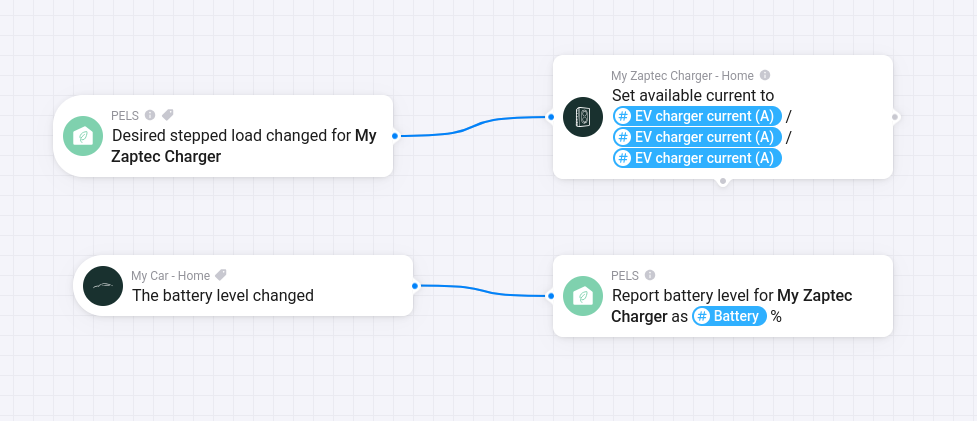 Figure 1. Example Zaptec wiring: PELS emits the desired charger current, and the car battery level is reported back to PELS.
Flow alternative
Use this Flow shape:
| Flow part | Card |
|---|---|
| When | PELS: Stepped device target changed for your Zaptec charger |
| Then | Zaptec: Set available current to |
Choose Use a Flow in Charging current. PELS controls start and stop separately.
In the Zaptec action card, use the PELS Flow tag EV charger current (A) for the available-current value.
PELS handles the 1-phase or 3-phase conversion based on the EV control mode selected in PELS. Do not use Planning power (W) for the Zaptec current field unless you are intentionally building a manual conversion Flow.
Battery Reporting
The generic EV charger guide covers battery reporting. For Zaptec, choose the same Zaptec charger in Report battery level for charger as you use in the current-control Flow.
That adds battery reporting to PELS, which can be used by EV boost mode.