
How-To: Combine Custom Device Control With an External Power Meter
Use a virtual device when a device's Homey app offers custom on/off commands, but a separate smart plug or sub-meter measures its power. You need three standard Homey Flows: one to copy the watts, one to send Off, and one to send On.
The physical socket stays powered. PELS manages the virtual device, and your Flows send the real device's commands.
What You Need
- The device's custom on/off actions in Homey. These might be called Disable / Enable or Pause / Resume.
- A meter that reports that device's power in watts, rather than the whole home's consumption.
- The Virtual Devices app.
Test the commands first and check what they do. PELS will send the On command when power allows, so choose an action that is appropriate for automatic use.
1. Create the Virtual Device
- Add a device in Homey: Virtual Devices > Device > Connect.
- Give it a name such as Device (PELS) and choose an icon.
- Under Device Class, choose Wall Plug.
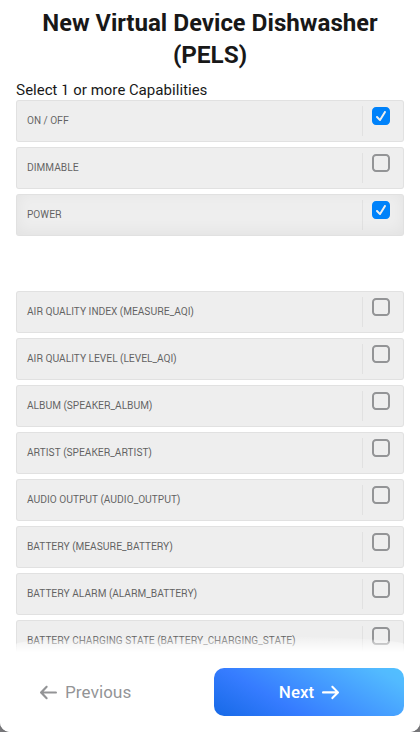
- Under Capabilities, select On / Off and Power. Leave Dimmable and the other capabilities unchecked.
- Select Next.
This creates a device with onoff and measure_power. Its switch means allowed to run; its watts come from the external meter. The actual appliance may still be idle while the virtual switch is on.
2. Make Three Flows
The names below stand for your real device, its meter and the new virtual device.
| Flow | When | Then |
|---|---|---|
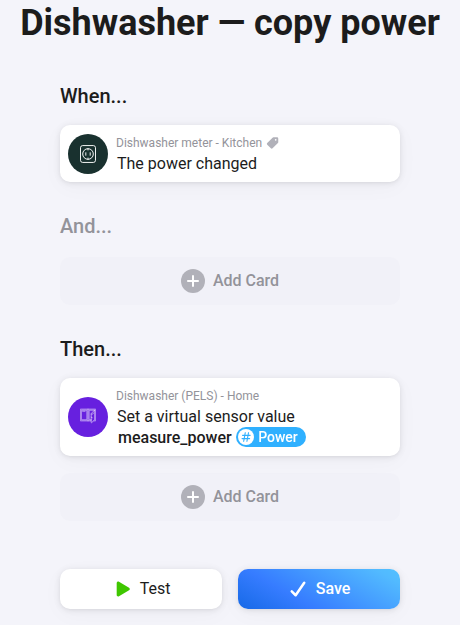
| Copy power | Device meter > The power changed | Device (PELS) > Set a virtual sensor value: sensor measure_power, value the meter's Power tag. |
| Turn off | Device (PELS) > Turned off | The real device's custom Off action. |
| Turn on | Device (PELS) > Turned on | The real device's custom On action. |
Use the meter's device tag as the value, not a typed wattage. The first Flow copies every power change, including a drop to 0 W. Run it once to copy the current reading before enabling PELS.
Keep command Flows in one direction: virtual switch to real device. Do not copy the appliance's status back into the virtual switch; that mixes up running with allowed to run and can repeat commands. Use the virtual switch for manual on/off changes too.
3. Add It to PELS
- Set the virtual switch to its intended starting state. Turning it on also sends your On command.
- In PELS, open Devices, select Refresh devices, and enable Managed by PELS for the virtual device.
- Enable Power-limit control, with Turn off as the limiting action.
- Under Setup, set Power when running to the device's rated running draw in watts. For a device rated up to 2200 W, enter 2200.
Leave the real device and its metering socket unmanaged. None of these Flows should switch the physical socket. The virtual device is not PELS's whole-home meter; keep your existing household meter selection.
The socket and virtual device report the same watts. To count them once in Homey Energy, open the socket's settings and enable Advanced Settings > Energy > Exclude from Energy.
Check the finished setup: the virtual watts should match the meter, turning the virtual switch off and on should send the custom commands, and the physical socket should stay powered. PELS observes the virtual switch; check the real device to confirm that it accepted a command. Its actual draw remains visible in the household meter while a command takes effect.
Example: AEG Dishwasher
For an AEG dishwasher, use the same setup with the names Dishwasher, Dishwasher meter and Dishwasher (PELS). Select On / Off and Power when creating the virtual device:
The three Flows become:
| When | And | Then |
|---|---|---|
| Dishwasher meter > The power changed | Copy its Power tag to Dishwasher (PELS)'s measure_power. | |
| Dishwasher (PELS) > Turned off | Dishwasher > Appliance State is Running | Execute Dishwasher Command > Pause. |
| Dishwasher (PELS) > Turned on | Dishwasher > Appliance State is Paused | Execute Dishwasher Command > Resume. |
Select a screenshot to open it at full size.
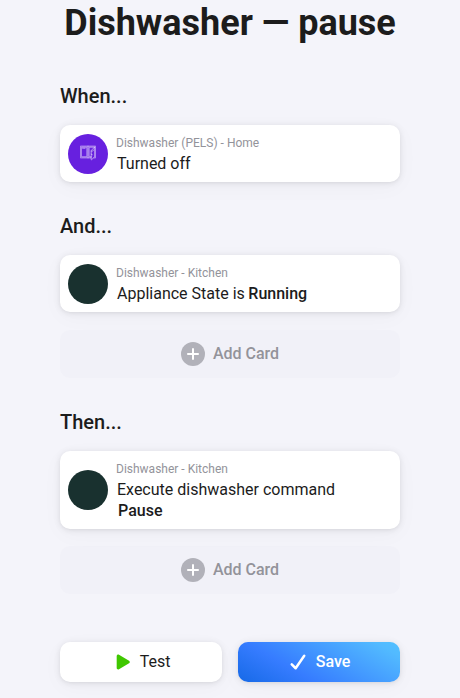
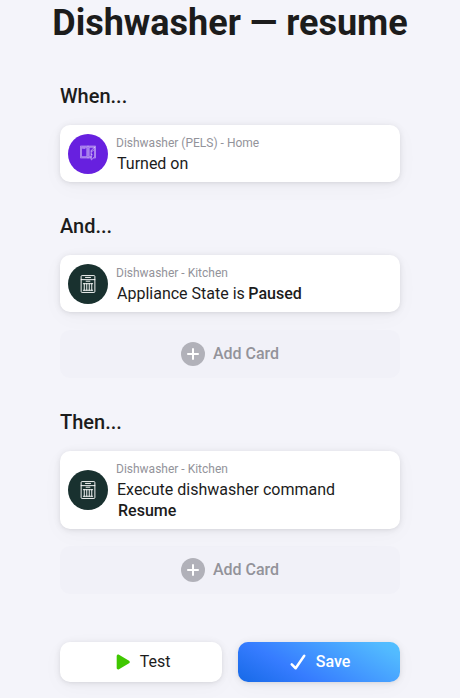
Start the wash yourself. These Flows use Pause and Resume, so they continue the existing programme. Do not use Start or Stop / Reset: those can start a new programme or cancel the current one.
Use the appliance's programme state for the conditions. 0 W alone does not mean the wash has finished.
These Flows react to virtual-switch changes. If the AEG status is delayed, a Running or Paused condition can skip a command; check the dishwasher and pause or resume it there. A programme started while the virtual switch is already off can also keep running. The virtual switch shows permission, while the meter continues to show the actual draw.
Optional: This example may resume a manual pause when PELS turns the virtual device on. If you need to resume only pauses initiated by PELS, add a pause-ownership variable as a Resume condition; device state alone cannot tell who paused it.