
Homey EV charging without crossing your power limit
EV charging is usually one of the largest flexible loads in a home. That makes it useful for price shifting and peak shaving, but risky if it runs at the same time as heating, hot water, cooking, or ventilation.
PELS helps Homey coordinate EV charging with the rest of the house. It watches whole-home power, protects the configured hard cap, and calculates how much available power can be used by lower-priority loads. When there is room, charging can continue. When the house approaches the power limit, PELS can reduce or pause charging before the limit is crossed.
When this is useful
Use this setup when you want to:
- charge an EV in cheaper hours
- charge in cheap hours without letting charging ignore the rest of the home
- avoid crossing a capacity tariff or power-limit step
- use peak shaving to keep short high-load periods below the hard cap
- keep EV charging from competing blindly with heating or hot water
- let higher-priority devices win when available power is limited
- control an Easee charger directly, or use Homey Flows to connect PELS to a charger app such as Zaptec or another charger integration
PELS plays the brain role and lets your charger app keep doing what it does best: PELS decides the desired charging current or available power based on price, total power, and priorities; the charger app delivers it to the charger.
How it works
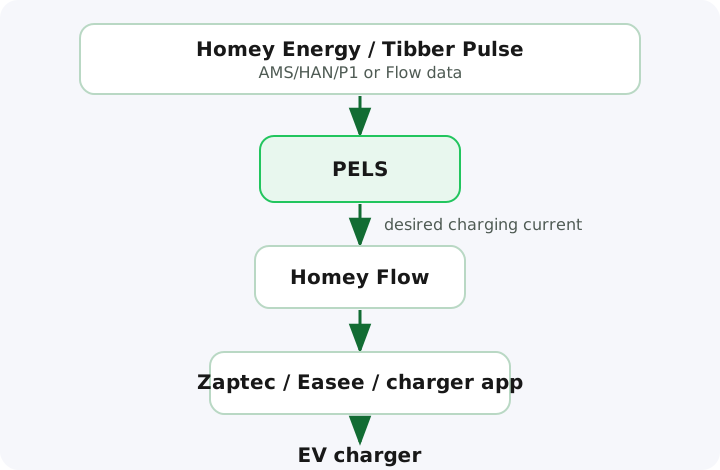
A Flow-controlled Homey EV charging setup, such as Zaptec, looks like this. New Easee setups can use the direct path described in the Easee guide; existing Easee current-control Flows remain supported.
- Homey receives whole-home power from Homey Energy, Tibber Pulse, AMS/HAN/P1, or Flow data.
- PELS reads the current house load and configured hard cap.
- PELS calculates how much power is available for managed devices.
- PELS exposes the desired EV charging current through Flow tags.
- A Homey Flow sends that value to the charger app.
The important split is:
- PELS handles planning, priorities, cheap hours, and power-limit protection.
- The charger app handles the actual charger command.
Example: EV charging has lower priority than heating and hot water
In this setup, the EV is flexible. Hot water and critical heating should win first.
Example priority order:
- critical heating
- hot water
- normal heating
- EV charging
- ventilation boost or other flexible loads
If total power gets close to the hard cap, PELS can reduce or pause the EV first. When the house load drops again, PELS can resume charging.
This is a good default for homes where the car only needs to be ready by morning, not charge as fast as possible all evening.
Example: EV charging has higher priority
Sometimes the EV is the important task. For example, the car may need enough charge before an early trip.
In that case, give the EV a higher priority or use a Smart task with a target and ready-by time. PELS can then protect the hard cap while still giving the EV more room than less important loads.
This does not mean the hard cap is ignored. The hard cap still wins. Priorities decide which devices are reduced first when power is limited.
Cheap hours still need power room
Cheap electricity is only useful if there is available power.
PELS can move flexible charging toward cheaper hours, but it should not blindly start everything at the same time just because the price is low. If heating, hot water, and EV charging all run together, the home may cross the configured power limit.
PELS therefore treats the hard cap as the safety boundary. Price shifting happens inside that boundary.
What cheap-hour charging saves (illustrative)
Charging is the biggest single load most homes can move, so it's where shifting pays off most. Add 40 kWh in a session during 0.40 kr/kWh night hours instead of a 1.20 kr/kWh evening peak, and you pay about 16 kr instead of 48 kr — roughly 30 kr a charge, with no change to how charged the car is by morning.
The figures are illustrative; the wider your day's cheap-to-expensive price spread, the more there is to save. A Smart task or Flow-booked hours place the charging for you, inside the hard cap. To check your own numbers, see the Budget → Hourly plan view and the price level on PELS Insights.
What you need
You normally need:
- a Homey Pro setup
- whole-home power measurement through Homey Energy, Tibber Pulse, AMS/HAN/P1, or Flow data
- an EV charger paired in Homey
- a charger app or Flow action that can set charging current or available power
- a price source if you want cheap-hour charging
- configured priorities in PELS
With reliable whole-home power data in Homey, PELS keeps EV charging inside your limit hour after hour — no surprise capacity steps on the next bill.
Charger apps and Flows
PELS works with any Homey charger app that exposes a current or available-power action — keep the charger app you already use and connect it to PELS with a Homey Flow.
For example:
- PELS calculates the desired charging current.
- A Flow reads the PELS current value.
- The Flow sends that value to the charger app.
- The charger app applies it to the charger.
This keeps PELS focused on whole-home power management instead of duplicating every charger integration.
Easee example
With the Easee app for Homey, PELS sets the charging current itself and reads it back from the charger, so there is no Flow to build for it. Pick the EV control mode for the charger and PELS turns on built-in control, unless one of your Flows already sets the charger's current.
Zaptec example
Zaptec chargers are a good example because the Zaptec Homey app can expose actions for available charging current. PELS can calculate the desired current, and a Flow can pass that value to Zaptec.
Start here:
General EV charger setup: